If a picture is worth a thousand words and a video is worth a thousand pictures, here's a million words....
Click here to View
19 May 2013

30 April 2013
Uchi has a cat, ohh (B)Rat
My Phidget LED 64 - Advanced board had arrived a couple of days back.
As I indicated elsewhere, configuring my 'inputs' is now, no longer a concern for me. There are multiple options already available, and with Tripod's SuperScript Ver 2.00 almost on its final iteration, mostly, I'm going to use that tool for all input functions.
Did a little testing with my Phidget board today.
Unpacked the board, and powered it up. Connected two green LEDs on Pin 0 & 1. And fired up the Phidget configuration utility. The utility detected the board immediately. Configured the LED voltages and current values and voila, the LEDs lit up bright and shiny.


Fired up the FS2Phidgets utility developed by Alan from "MyCockpit.Org".
While FS2P detects my board correctly, but, despite spending many hours trying to debug, I'm not able to configure the board. The LEDs therefore continue to glow unencumbered by my efforts.
I now know what I need to do for next few days.
Read. A lot.
..and fix this (B)rat.
As I indicated elsewhere, configuring my 'inputs' is now, no longer a concern for me. There are multiple options already available, and with Tripod's SuperScript Ver 2.00 almost on its final iteration, mostly, I'm going to use that tool for all input functions.
Did a little testing with my Phidget board today.
Unpacked the board, and powered it up. Connected two green LEDs on Pin 0 & 1. And fired up the Phidget configuration utility. The utility detected the board immediately. Configured the LED voltages and current values and voila, the LEDs lit up bright and shiny.


Fired up the FS2Phidgets utility developed by Alan from "MyCockpit.Org".
While FS2P detects my board correctly, but, despite spending many hours trying to debug, I'm not able to configure the board. The LEDs therefore continue to glow unencumbered by my efforts.
I now know what I need to do for next few days.
Read. A lot.
..and fix this (B)rat.
Tripod's SuperScript Ver 2.00
Tripod has been burning a lot of midnight oil, just to get the SuperScript Ver 2.00 up and running. Ver 2.00 of the script is now 'event driven' and is supposedly more efficient script.
Over the last couple of weeks, was beta testing a developmental script for Tripod. The script is appropriately called as 'SuperCartridge' is intended to add a 'Data Cartridge' functionality to the Super-Bug. Al Rosenberg, as always, is the technical expert on the correctness of scripts compliance with real world procedures. My job was primarily to test the script and just see if my computer doesn't blow up. The SuperCartridge is coming along very nicely, and when complete this is going to considerably add to the overall F/A-18E experience.
Yesterday night, Tripod sent me an advance copy of SuperScript Ver 2.00. Spent a large part of yesterday night looking at the documentation. This version provides a single point interface for both input and output functions.
Even though, this was the first time, I was looking at the documentation Tripod has created, I instinctively knew, this script is a 'winner'. I knew, I'm going to use it for all my 'input' functions. I don't even feel the need to test it. Having looked at this documentation, I know it will work.
My only concern now remains, configuration of flight sim outputs, to drive my LEDs.
While Tripod's script also provides output functionality, but, it's primarily coded in LUA. I have already committed myself to using output boards from Phidget, and these boards do not directly interface with LUA. They do however interface with FSUIPC.
Need to find a little more time, and learn how to mate Tripod's script with my boards using FSUIPC.
Over the last couple of weeks, was beta testing a developmental script for Tripod. The script is appropriately called as 'SuperCartridge' is intended to add a 'Data Cartridge' functionality to the Super-Bug. Al Rosenberg, as always, is the technical expert on the correctness of scripts compliance with real world procedures. My job was primarily to test the script and just see if my computer doesn't blow up. The SuperCartridge is coming along very nicely, and when complete this is going to considerably add to the overall F/A-18E experience.
Yesterday night, Tripod sent me an advance copy of SuperScript Ver 2.00. Spent a large part of yesterday night looking at the documentation. This version provides a single point interface for both input and output functions.
Even though, this was the first time, I was looking at the documentation Tripod has created, I instinctively knew, this script is a 'winner'. I knew, I'm going to use it for all my 'input' functions. I don't even feel the need to test it. Having looked at this documentation, I know it will work.
My only concern now remains, configuration of flight sim outputs, to drive my LEDs.
While Tripod's script also provides output functionality, but, it's primarily coded in LUA. I have already committed myself to using output boards from Phidget, and these boards do not directly interface with LUA. They do however interface with FSUIPC.
Need to find a little more time, and learn how to mate Tripod's script with my boards using FSUIPC.
13 April 2013
Phidgets
Past few months, work has been a little more hectic than usual. What little free time (if any) was available, was spent with flying FSX. The pit build therefore has suffered since then.
Starting mid-May, my work takes me to a different city. Shifting my house, and getting setup at new place, will now take priority over everything else. Till end-June, I don't see this project progressing any further.
In the meanwhile, I'm more than ever convinced that, while FSUINO and Arduino are good, but they won't work for me. In the meanwhile, I have done a bit of testing with 'Phidgets' and this looks like (for me) a better implementation of output scripts. These boards interface with FSX easily using FS2Phidget script by Alan. The script can be downloaded from mycockpit.org
Just ordered myself a Phidget LED-64 Advanced board and Phidget Interface Kit (0/16/16).
While the LED board is a necessity, the interface kit is a bit of an overkill. For one, it provides with ability to add another 16 inputs, but the reason for my choice was its 16 digital outputs. Each output is rated for 200 milli-ohms and 2 Amps of current per channel and 30VDC voltage. While I can drive 64 LEDs with the LED board, each output channel on that board is only rated for a max of 10mA current.
Some indicators in the pit (like Master Caution, Fire Warning Lights, for example) are very big and bright annunciators. With the LED board, I didn't have enough current carrying capacity available to drive more powerful lights. With this interface kit, I will be able to overcome that limitation. Due to better current/voltage handling capacity of this board, eventually, if I ever decide to do that, I could also use these channels to drive servo's (a.k.a custom cockpit instruments like battery gauge, hydraulic pressure gauge e.t.c, or rudimentary motion control).
With this purchase, I have now collected about everything I will need for the build, with the exception of various cockpit knobs. Those will be a tough cookie to source. But, we will cross that bridge when we reach it.
In case I get stuck, my teen daughter is doing a research of her own. She has been collecting anything that remotely looks like a knob (fan regulator switches, broken rotary knobs from old electrical appliances, knobs sealing plastic bottles, including toothpaste tubes, shaving cream tubes and the like). She is confident, with a little molding using dried paper paste, plastic glue and color, she will be able to mold shapes that will look like knobs for me. Gotta love daughters.
Starting mid-May, my work takes me to a different city. Shifting my house, and getting setup at new place, will now take priority over everything else. Till end-June, I don't see this project progressing any further.
In the meanwhile, I'm more than ever convinced that, while FSUINO and Arduino are good, but they won't work for me. In the meanwhile, I have done a bit of testing with 'Phidgets' and this looks like (for me) a better implementation of output scripts. These boards interface with FSX easily using FS2Phidget script by Alan. The script can be downloaded from mycockpit.org
Just ordered myself a Phidget LED-64 Advanced board and Phidget Interface Kit (0/16/16).
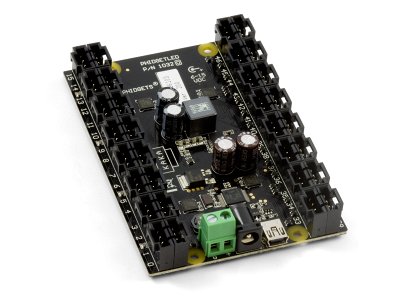 |
| Phidget LED-64 Advanced |
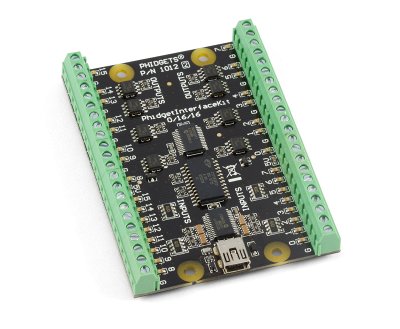 |
| Phidget Interface Kit 0/16/16 |
Some indicators in the pit (like Master Caution, Fire Warning Lights, for example) are very big and bright annunciators. With the LED board, I didn't have enough current carrying capacity available to drive more powerful lights. With this interface kit, I will be able to overcome that limitation. Due to better current/voltage handling capacity of this board, eventually, if I ever decide to do that, I could also use these channels to drive servo's (a.k.a custom cockpit instruments like battery gauge, hydraulic pressure gauge e.t.c, or rudimentary motion control).
With this purchase, I have now collected about everything I will need for the build, with the exception of various cockpit knobs. Those will be a tough cookie to source. But, we will cross that bridge when we reach it.
In case I get stuck, my teen daughter is doing a research of her own. She has been collecting anything that remotely looks like a knob (fan regulator switches, broken rotary knobs from old electrical appliances, knobs sealing plastic bottles, including toothpaste tubes, shaving cream tubes and the like). She is confident, with a little molding using dried paper paste, plastic glue and color, she will be able to mold shapes that will look like knobs for me. Gotta love daughters.
05 January 2013
Touch Monitor Kit
In what ever little time I get these days, I have been working on a 'card board' mock up of the pit. The idea being, to get a hang of sizes of various panels I will need to fabricate, and to identify cabling requirements for the I/O boards. Shall post pictures of the mock up pit in my next post.
Had originally decided to use my 24" monitor as the primary display to run my L/R DDIs, UFCP and also the MPCD.
While working on the mock up pit, I realized that 24" monitor doesn't have adequate real estate to accommodate all four instrument panels.
So decided to order myself another 8" touch panel along with touch screen to fabricate the UFCP (Up Front Control Panel).
Instead of purchasing a ready-made monitor, I also decided to purchase a 'kit'. A kit will provide me with flexibility to fabricate my own UFCP.
The 'kit' arrived a couple of days back.


Haven't had the time to test the assembly yet. Other than the damaged micro-switch, rest of the 'kit' looks in good shape. I don't need those display controls for my pit, but, if they are ever needed, I will be able to replace/repair this microswitch myself.
The size of the monitor is just about correct to make a 'handsome' UFCP.
I'm now excited to rig this up.
If only I can get a little more time on my hand.
Had originally decided to use my 24" monitor as the primary display to run my L/R DDIs, UFCP and also the MPCD.
While working on the mock up pit, I realized that 24" monitor doesn't have adequate real estate to accommodate all four instrument panels.
So decided to order myself another 8" touch panel along with touch screen to fabricate the UFCP (Up Front Control Panel).
Instead of purchasing a ready-made monitor, I also decided to purchase a 'kit'. A kit will provide me with flexibility to fabricate my own UFCP.
The 'kit' arrived a couple of days back.

Boxed kit as it arrived
During the ordering process, I had indicated to the vendor that I need this kit in a little hurry. He made sure the complete postal department understood the need for V(ery).V(ery).Most Urgent need.

Opening the box

I had ordered a 'power adaptor' separately, I see that they have remembered to pack it along

Unpacking the 'board'

'USB Touch Controller' board on the left side and touch monitor packed on the right side

A close up shot, to document any damages during transit. The 'stand-by' micro-switch button is damaged. But, it's nothing that I can't fix myself


Driver CD is enclosed, also


USB touch controller board

Complete assembly. The 'ribbon' cables are notoriously fickle and need to be handled VERY carefully, lest they get damaged. VGA display connector (blue) is visible in the left-centre of the display controller board.
The size of the monitor is just about correct to make a 'handsome' UFCP.
I'm now excited to rig this up.
If only I can get a little more time on my hand.
27 December 2012
"FSUINO" is born
Yesterday night, Glenn had written up a small LUA script just to test out its ability to send out one FSX toggle button command through FSUIPC and LUA script to a 'com port'.
He pointed me to a You Tube video tutorial on how to write a Arduino Sketch to read "serial data" through serial (com) port.
Didn't realize that code writing could be so sensitive to correct syntax. There were compile errors in almost every line of code I wrote.
Finished code is as follows:-
He pointed me to a You Tube video tutorial on how to write a Arduino Sketch to read "serial data" through serial (com) port.
Didn't realize that code writing could be so sensitive to correct syntax. There were compile errors in almost every line of code I wrote.
Finished code is as follows:-
Arudino Outputs
Work has been hectic, past few weeks.
It's likely to stay so, for the coming couple of months.
Was compiling a list of all items that have already arrived, and items that I still need to order. Also made a list of 'back end' work I can do, before I commit myself to fabricating the cockpit 'tub' and panels.
Realized that my 24" monitor may not have enough real estate to position all four display panels (L/R DDIs, UFCP and MPCD). So, have ordered myself another 8" touch screen monitor for UFCP (that was the original idea to begin with). The monitor will be VGA driven, while touch controls will work off USB.
While all (well, most) of the pit switches will be driven off the Leo's boards, but my Arduino Leonardo is planned to drive all my cockpit annunciators.
There's only one small problem.
I don't know how to program micro-controller boards. Yet!
Also, as of this time, there is only guy on 'my cockpit.org' who has ever written a code to interface an Arduino board with FSUIPC.
Glen Tripod (VRS Forums) from down under has written a beautiful compilation of LUA scripts (both input and output scripts). These scripts are a dream for any pit builder. But, these scripts are useless on my Arduino board, due to lack of an interface between sketch and FSUIPC.
Been talking to Tri about this for last two days, and he has agree to help me through this.
Wrote my first Arduino Sketch today (light up Pin 13 with pre set delay). It worked.
Tri has sent me a 'test LUA script' to experiment with the serial interface. Learning the ropes with working with LUA and FSUIPC and Sketch at the same time.
For a person who has NEVER written a single line of code in his life, this is nerve wrecking, frustrating, but fun and exhilarating at the same time.
Loving my new hobby, more and more everyday.
It's likely to stay so, for the coming couple of months.
Was compiling a list of all items that have already arrived, and items that I still need to order. Also made a list of 'back end' work I can do, before I commit myself to fabricating the cockpit 'tub' and panels.
Realized that my 24" monitor may not have enough real estate to position all four display panels (L/R DDIs, UFCP and MPCD). So, have ordered myself another 8" touch screen monitor for UFCP (that was the original idea to begin with). The monitor will be VGA driven, while touch controls will work off USB.
While all (well, most) of the pit switches will be driven off the Leo's boards, but my Arduino Leonardo is planned to drive all my cockpit annunciators.
There's only one small problem.
I don't know how to program micro-controller boards. Yet!
Also, as of this time, there is only guy on 'my cockpit.org' who has ever written a code to interface an Arduino board with FSUIPC.
Glen Tripod (VRS Forums) from down under has written a beautiful compilation of LUA scripts (both input and output scripts). These scripts are a dream for any pit builder. But, these scripts are useless on my Arduino board, due to lack of an interface between sketch and FSUIPC.
Been talking to Tri about this for last two days, and he has agree to help me through this.
Wrote my first Arduino Sketch today (light up Pin 13 with pre set delay). It worked.
Tri has sent me a 'test LUA script' to experiment with the serial interface. Learning the ropes with working with LUA and FSUIPC and Sketch at the same time.
For a person who has NEVER written a single line of code in his life, this is nerve wrecking, frustrating, but fun and exhilarating at the same time.
Loving my new hobby, more and more everyday.
Subscribe to:
Posts (Atom)